Lomzurel
Luma Capsule
Luma Capsule
Couldn't load pickup availability
1. Problem Statement
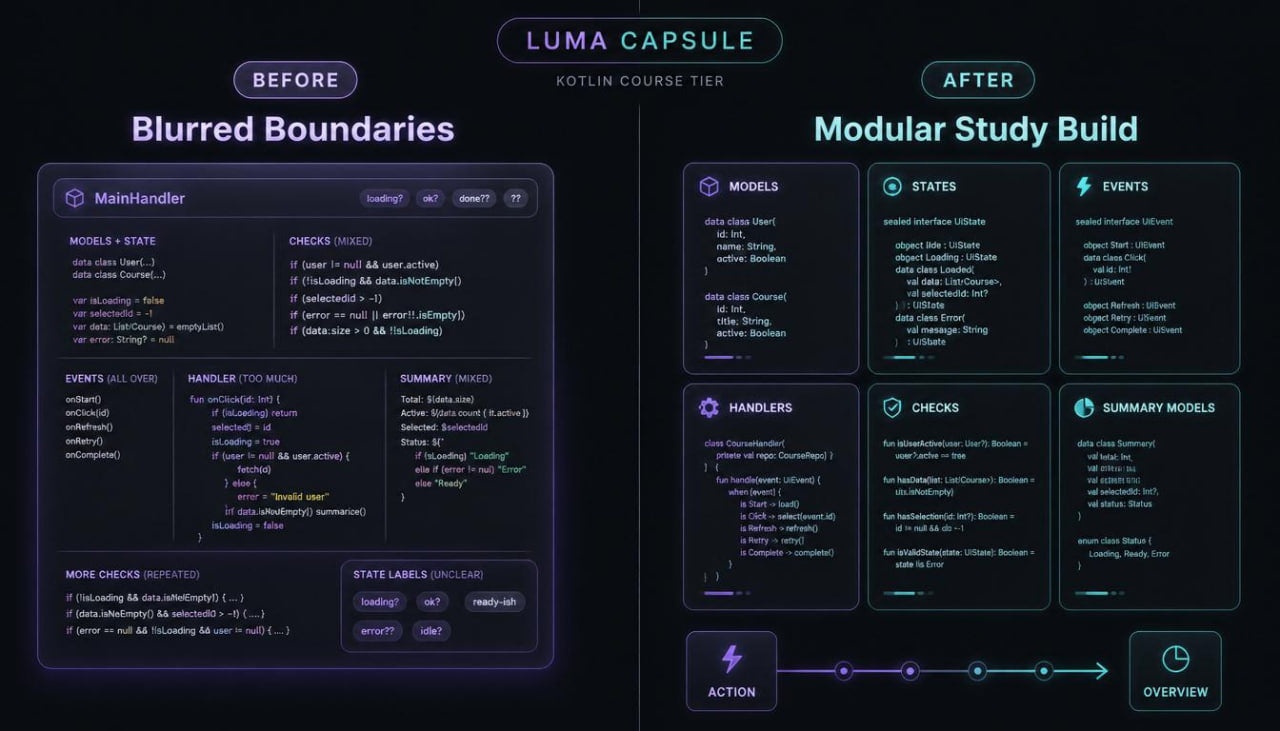
After topics such as models, states, events, and handlers, a learner may create separate connected fragments, but a wider learning build can still feel complex. When several models, several event types, different state variants, and multiple handling routes appear, the code needs more careful organization. Without clear boundaries, one part begins to carry too many tasks: a model stores extra logic, a handler becomes too long, checks repeat, and the summary block becomes mixed with main handling. Because of this, a learner may understand separate Kotlin topics but feel lost when building a larger study task. At this stage, it is important to learn not only the links between parts, but also the order in which those parts should interact.
2. Solution
Luma Capsule is created as a pre-final learning stage where attention moves toward modular Kotlin structure. This tier shows how to separate data, states, events, checks, handling, and summary presentation so every part has its own role. The materials explain how to create several connected models, describe state variants, build handling routes, and check data before changing the result. The learner works with study builds where one action passes through several stages: receiving data, checking, selecting an event, updating state, and preparing a summary. This format helps learners move from separate exercises toward more composed Kotlin thinking.
3. What’s Inside
Luma Map: The Light Between Parts
The first module explains the idea of the tier: wider code is easier to read as a group of parts with their own roles, not as a long text. The learner sees a map: models describe data, states show position, events mark action, handlers perform the route, checks watch correctness, and a separate block prepares the result for reading. This map helps show where an action begins, where state changes, and where the summary is formed. The section also includes exercises for reviewing an existing structure: learners decide which part does what, where boundaries are blurred, and which part should be separated.
Module Boundaries: Boundaries Between Learning Parts
This block focuses on dividing code into logical parts. The learner studies how not to mix data description, checking, handling, and summary preparation. The materials show examples where one large fragment is divided into several smaller parts: a separate model, a separate check function, a separate handler, and a separate function for a text overview. Tasks ask learners to find parts that carry too many tasks and rewrite them into a more orderly form. This helps with reading code and returning to it during review.
Sealed State Notes: Ordered State Variants
In this module, the learner meets a more disciplined way to describe states. The materials show how to present several variants: empty, loaded in a study example, handled, containing an issue, waiting for action, or carrying incomplete data. The main idea is that state should not be random text, but a readable form. The learner works with examples where each state has its own data and its own role in logic. Exercises ask learners to describe a state group, define allowed changes, and explain why a certain action does not fit a specific state.
Event Route: Event Routes
This section expands the topic of events. The learner sees that an event may be not only a separate action, but also part of a route. For example, creating a record may lead to checking, checking may lead to state change, and state change may lead to overview preparation. The materials explain how to describe events so they do not carry extra logic, but only mark what needs handling. Tasks include creating several event types, comparing their roles, and building a compact route from event to summary.
Handler Layers: Handling Layers
The central block of the tier is devoted to handlers with several stages. The learner studies how a handler receives an event, reads the current state, checks data, performs an action, and returns an updated state or summary object. The materials show how to divide handling into steps to avoid overly long conditions and repetition. Exercises include scenarios: add a new record, change an element state, update data, reject an incorrect value, or prepare an overview after handling. The learner practices explaining every stage in their own words.
Validation Grid: Check Grid
In this module, checks are treated as a separate layer rather than random conditions inside code. The learner creates a grid of rules: checking empty text, a missing value, an incomplete model, an unsuitable state, an empty list, or repeated data. The materials explain how to group checks so they stay visible and do not repeat in different places. Tasks ask learners to rewrite a fragment where checks are scattered across the build into a version with a clearer sequence.
Result Models: Summary Models
After data handling, it is often useful to return not just text, but a separate summary model. In this block, the learner studies how to describe a result: handling state, message list, number of changed elements, compact overview, or a marker for the next step. The materials explain why a summary object may be more convenient than a group of separate values. Exercises help learners create a result model, add fitting properties, and use it after event handling.
Composition Lab: Putting Parts into One Learning Build
This practical section connects the tier topics. The learner creates several models, describes states, adds events, forms checks, writes a handler, and prepares a summary model. For example, a learning build may contain a group of cards, handling states, change events, check rules, and a summary overview. The task is arranged in stages: first describe data, then add states, define events, create checks, and only then compose handling. This helps avoid chaotic writing.
Refine Room: Careful Structure Rewriting
In this block, the learner receives study fragments where parts are mixed or named unclearly. The task is to find where a handler carries extra work, where a model contains unnecessary data, where a check repeats, and where a summary block is mixed with action. The materials show how to rewrite a fragment not for shortening, but for a clearer role of each part. Tasks include hints while still leaving space for independent structure choices.
Luma Build: Pre-Final Learning Build
The final module asks learners to create a wider learning build with several connected parts. It includes models, states, events, checks, handlers, a data list, a summary model, and a compact overview. The learner moves from the starting idea to a completed study structure while explaining why each part is placed where it is. This ending prepares for the final tier, where structure becomes wider and requires more careful planning.
Luma Review: Final Self-Check
The last block includes questions: how to define the boundary of a code part, when a separate state is needed, how not to overload a handler, where to place checks, when to create a summary model, and how to explain the handling route from event to result. It also includes exercises on finding extra roles, renaming parts, and simplifying a learning build.
4. Who Is This For?
Luma Capsule is for learners who have already worked with models, interfaces, nested structures, states, events, handlers, checks, and lists. This tier fits those who want to move from separate connected fragments into a more composed learning structure. It can help learners who want to understand boundaries between code parts more clearly, avoid overloaded handlers, and describe the result as a separate model. The materials also fit those who want to work more carefully with event routes and state changes. Luma Capsule should be studied after previous tiers because it builds on a wide base of Kotlin topics and prepares for the final learning build.
5. What You’ll Learn
- How to build a wider Kotlin structure from several connected parts.
- How to define boundaries between models, states, events, and handlers.
- How to describe ordered state variants.
- How to create event routes from action to summary.
- How to divide handling into several readable layers.
- How to create a check grid for a learning build.
- How to avoid repeating the same conditions in different places.
- How to create summary models after handling.
- How to work with data lists inside a wider structure.
- How to explain the move from event to new state.
- How to rewrite mixed fragments into orderly parts.
- How to find code parts that carry too many tasks.
- How to compose a pre-final learning build with several roles.
- How to prepare for the final tier through careful structure planning.
6. 30-Day Terms After Checkout
For Luma Capsule, there is a 30-day period during which a learner may contact the Lomzurel team with a payment-related request. The team reviews such messages through a transparent process and may ask for a brief reason so the situation can be handled correctly. These terms apply to the tier purchase and do not include claims about a specific learning, work, or financial result. Luma Capsule materials are intended for step-by-step Kotlin skill development through modular structure, states, events, checks, handlers, and practical exercises. This tier is presented as a learning capsule for careful work with wider code structure, examples, and independent tasks.
Self-paced learning overview
- 📁 Digital file available after purchase
- 🕒 Long-term availability
- 🔐 Secure checkout
- 🗓️ Content updated in 2026
Are the materials suitable for beginners?
Are the materials suitable for beginners?
Yes, some tiers are made for starting with basic concepts, while others gradually add more advanced topics. Each tier has its own depth, so learners can move from simple explanations to broader practical tasks.
Should the tiers be studied in order?
Should the tiers be studied in order?
Following the list is recommended because each next tier expands on topics from the previous one. Learners with Kotlin experience can choose a tier based on the description and their study goals.
What is included in the learning materials?
What is included in the learning materials?
The tiers may include modules, written explanations, code examples, practical exercises, mini projects, self-check prompts, and structured tasks. The exact content depends on the tier level.
Share